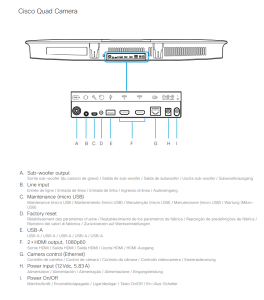
Se denne video
Factory reset using the reset button through the pinhole.
We recommend that you back up the log files and configuration of the device before you continue with the factory reset.
1. Insert a paper clip (or similar) into the pinhole. Press and hold the recessed reset button until the screen turns black (approximately 10 seconds).
Then release the button.
2. Wait while the device reverts to the default factory settings. When finished, the device restarts automatically. This may take a few minutes.
When the device has been successfully reset to factory settings, the Setup assistant starts with the Welcome screen.
Hardreset er via pinhole bag på codec (find reset hul ved bokstav K)
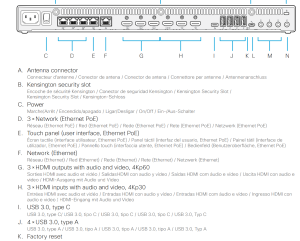
Reset bar på Cisco EQ (find reset hul ved bokstav D)